


Lenovo ThinkPad Pro Dock 40A9 Docking Station for Multi-Monitor Workstations
Lenovo ThinkPad Pro Dock 40A9 Docking Station for Multi-Monitor Workstations is backordered and will ship as soon as it is back in stock.
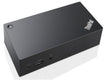
Lenovo ThinkPad Pro Dock 40A9 Docking Station for Multi-Monitor Wor...
Description
Description
Lenovo ThinkPad Pro Dock 40A9 Docking Station for Professional ThinkPad Workstations
- ✔ Central connection solution for compatible Lenovo ThinkPad notebooks
- ✔ Multiple monitor ports for more productive work
- ✔ Stable network and data connections via numerous interfaces
- ✔ Robust business hardware for daily office use
- ✔ Ideal for home office, office, and professional workstations
The Lenovo ThinkPad Pro Dock 40A9 Docking Station expands compatible Lenovo ThinkPad notebooks with numerous additional ports and simplifies the connection of monitors, network devices, and other peripherals. It enables a tidy workspace and significantly reduces the daily effort of connecting multiple devices.
Important note: A 20V / 4.5A (90W) power supply is required for operation. The power supply is not automatically included in the scope of delivery and should be considered before purchase.
More Ports for an Efficient Workstation
The Lenovo ThinkPad Pro Dock 40A9 serves as a central interface between the notebook and external hardware. Monitors, keyboards, mice, network cables, storage devices, and other components can remain permanently connected to the docking station.
This means that simply inserting the compatible ThinkPad notebook is enough to immediately access the entire workstation environment. This saves time and ensures much better organization at the desk.
Ideal for Multi-Monitor Setups
With two DisplayPort connections and one VGA connection, the docking station is ideally suited for workstations with multiple screens. Additional screen space facilitates working with spreadsheets, documents, development environments, or graphics software.
The combination of modern and classic video connections also allows the integration of existing monitors without additional adapter solutions.
Extensive Connectivity Options
- 3 x USB 3.0 for fast data transfers
- 2 x USB 2.0 for input devices and accessories
- 2 x USB-C for modern peripherals
- RJ-45 Gigabit Ethernet for stable network connections
- 2 x DisplayPort for external monitors
- 1 x VGA for older displays
- Audio output for speakers or headsets
Stable Network and Data Connections
Especially in professional work environments, a reliable network connection is crucial. The integrated Gigabit LAN port enables a stable wired connection and is particularly suitable for corporate networks, large data volumes, or applications with high demands on connection quality.
The USB 3.0 interfaces also ensure fast data transfers between the notebook and connected devices.
Compatibility with Lenovo ThinkPad Models
Compatibility is model-dependent. The Lenovo ThinkPad Pro Dock 40A9 was developed for various ThinkPad business notebooks.
- ThinkPad T470
- ThinkPad T470s
- ThinkPad T480
- ThinkPad T480s
- ThinkPad T490
- ThinkPad T490s
- ThinkPad T570
- ThinkPad T580
- ThinkPad T495
Please check compatibility with your notebook model before purchasing.
Technical Specifications
| Feature | Details |
|---|---|
| Model | Lenovo ThinkPad Pro Dock 40A9 |
| Type | Docking Station |
| Ports | 3x USB 3.0, 2x USB 2.0, 2x USB-C, RJ-45, VGA, 2x DisplayPort, Audio |
| Color | Black |
| Condition | Used (A-ware) |
| Required Power Supply | 20V / 4.5A (90W) |
Scope of Delivery
– Lenovo ThinkPad Pro Dock 40A9 Docking Station
Who is the Lenovo ThinkPad Pro Dock 40A9 suitable for?
The docking station is particularly suitable for businesses, home office users, developers, clerks, and all users who regularly switch their ThinkPad between mobile use and a stationary workstation.
With its wide range of ports and easy integration into existing workstation environments, the Lenovo ThinkPad Pro Dock 40A9 is a practical extension for professional Lenovo ThinkPad systems.
Shipping and payment terms
Shipping and payment terms
Free shipping from €50 (Germany) – within the EU from €100
Delivery
Delivery is made to the delivery address provided by the customer during the ordering process. By way of exception, where PayPal is selected as the payment method, the delivery address stored with PayPal at the time of payment is decisive.
If delivery to the customer was not possible and the transport company returns the goods to the seller, the customer bears the costs of the unsuccessful delivery. This does not apply where the customer exercises their right of withdrawal by refusing acceptance, where they are not responsible for the circumstance that made delivery impossible, or where they were temporarily prevented from accepting the goods – unless the seller had given them reasonable advance notice of the delivery.
Shipping costs
- Germany: free from an order value of €50, below that €3.99
- European Union: free from an order value of €100, below that €14.99
- Switzerland: €20.00
- United Kingdom: GBP 20.00
Delivery area and delivery time
We deliver to Germany, to the 26 other countries of the European Union and to Switzerland and the United Kingdom. We are currently unable to deliver to other countries.
For deliveries to Switzerland and the United Kingdom, customs duties, import taxes or other charges may be incurred in addition; these are borne by the customer.
The delivery time within Germany is usually 1–3 working days.
Payment methods
You can pay by credit card (Visa, Mastercard, Maestro), PayPal, Klarna (purchase on account or instalments), Shop Pay, Apple Pay, Google Pay, advance payment by bank transfer or cash on delivery.
Cash on delivery is only available for deliveries within Germany from an order value of €50. An additional fee of €9.99 is charged for it.
Digital licences and activations
Update licences, secure gateway activations and HaynesPro access are digital goods. No shipping costs apply – you will receive the activation code by email once payment has been received, usually within 1–3 working days.
If the licence is tied to a device, enter your device’s serial number directly in the order form when purchasing. That way we can set up the activation for your device without further enquiries.
Please note: for digital licences the right of withdrawal expires as soon as we have begun providing the item and you have expressly agreed to this beforehand. For devices and all other goods, the statutory right of withdrawal applies unchanged.
Questions about this product? Send us a message.
Frequently asked questions
Is the docking station compatible with my device?
Is the docking station compatible with my device?
The docking station is designed for the models listed in the title. Please check the model and connector before purchasing. If you have any questions about compatibility, we are happy to help you by phone.
What condition is the docking station in?
What condition is the docking station in?
The item has been technically inspected and tested and is in perfect, fully functional condition. You receive a 12-month warranty.
What ports does the station offer?
What ports does the station offer?
You will find the available ports (e.g. USB, LAN/Ethernet, HDMI, serial) in the product description. This lets you connect peripherals and network in one step.
What is included in the delivery?
What is included in the delivery?
The delivery includes the docking station; a matching power supply is included if stated in the description. You will find the details in the item description.

Lenovo ThinkPad Pro Dock 40A9 Docking Station for Multi-Monitor Workstations